
Alienware 15 DA15265 Upgrade Guide: RAM, SSDs, and Compatible Parts
What you can upgrade in the Ryzen 7 260 and RTX 5060 model, including limits and verified parts.
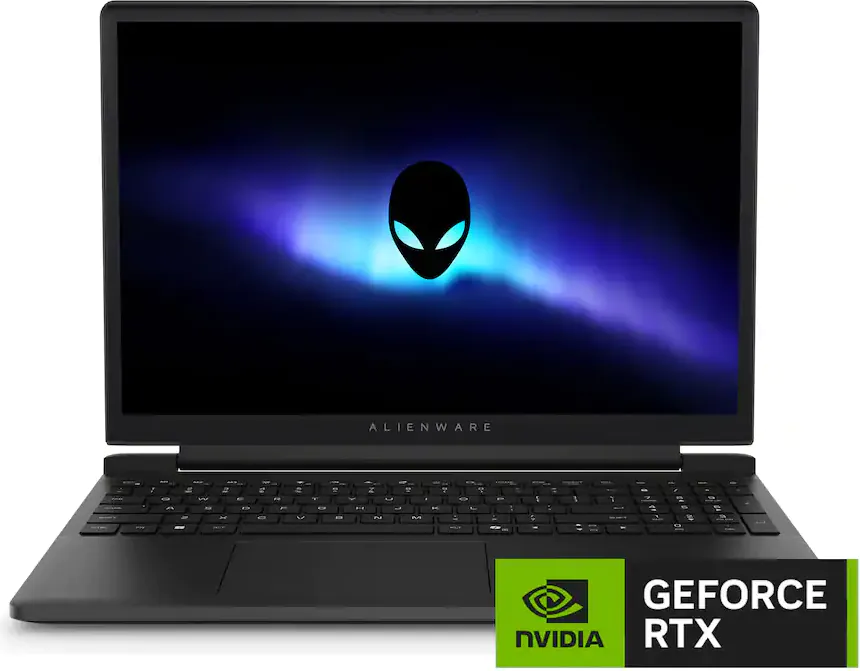
The Alienware 15 DA15265 is a 15.3-inch gaming laptop built around AMD Ryzen processors and NVIDIA GeForce RTX graphics. If you own the Best Buy configuration LDA15265-7256BLK-PUS, your system comes with an AMD Ryzen 7 260, an RTX 5060 with 8GB of graphics memory, 32GB of DDR5 RAM, and a 1TB NVMe SSD.
The good news is that the memory and SSD are replaceable. The catch is that this particular configuration already has Dell's maximum supported memory capacity of 32GB. That makes storage the most practical upgrade, especially if your existing 1TB drive is running out of room.
There are also a few things worth knowing about the processor, graphics, wireless card, and other replaceable components before spending money on parts. This guide covers the upgrade limits, compatible part numbers, and the details that matter when you're working on this specific Alienware model.
The DA15265 supports 32GB of DDR5-5600 memory across two SO-DIMM slots, so this configuration is already at Dell's supported limit.
The M.2 NVMe SSD is replaceable, with verified Kingston 2230 and 2280 options and a Dell-advertised 2TB storage limit.
The Ryzen 7 260 and RTX 5060 are not independently upgradeable components, but several internal parts can be replaced for repairs.
Alienware 15 DA15265 (LDA15265-7256BLK-PUS) Specifications
| Component | Specification | Upgrade Options |
| Model | Alienware 15 DA15265, LDA15265-7256BLK-PUS | Specific Ryzen 7 260 and RTX 5060 configuration |
| Processor | AMD Ryzen 7 260, 8 cores, 16 threads | No verified standalone CPU upgrade |
| Graphics | NVIDIA GeForce RTX 5060 Laptop GPU, 8GB GDDR7 | No verified standalone GPU upgrade |
| Memory | 32GB DDR5-5600 | Two SO-DIMM slots, 32GB Dell-supported maximum |
| Storage | 1TB PCIe NVMe SSD | Replaceable M.2 2230 or 2280, Dell-advertised 2TB limit |
| Wireless | MediaTek Wi-Fi 6 with Bluetooth | Replaceable WLAN card, approved higher-spec upgrades not verified |
| Battery | Internal lithium-ion battery | Service-replaceable; exact replacement requires verification |
| Display | 15.3-inch 2K display | Service replacement, no verified display upgrade |
Alienware 15 DA15265 Memory Upgrades
The Alienware 15 DA15265 has two DDR5 SO-DIMM slots and supports DDR5-5600 memory. Dell documents a maximum capacity of 32GB, which means the LDA15265-7256BLK-PUS configuration already ships with the maximum officially supported RAM.
That doesn't necessarily mean there's nothing worth checking. Dell offers a factory 32GB configuration using one 32GB module. If your laptop has a single module installed, it may be operating in single-channel mode. Two matched 16GB modules can enable dual-channel operation while keeping the same total capacity.
Dual-channel memory provides more memory bandwidth. That can help workloads sensitive to memory throughput, although you shouldn't expect every application or game to become noticeably faster. The benefit depends on the workload and whether memory bandwidth is currently a limitation.
Memory Compatibility Rules
- Use DDR5 laptop SO-DIMM modules, not desktop UDIMMs or server RDIMMs.
- Dell specifies DDR5-5600 memory for this platform.
- The supported maximum is 32GB, so two 16GB modules are a practical matched configuration.
- Use matching capacity, speed, and specifications when installing a pair.
- Check the installed memory arrangement before buying replacements.
Kingston's model-specific compatibility database lists DDR5-5600 SO-DIMM modules for the DA15265, including the 16GB KCP556SS8-16. Two of those modules provide a 32GB configuration with both memory channels populated.
Alienware 15 DA15265 Memory Limits
| Specification | Supported Configuration |
| Memory type | DDR5 SO-DIMM |
| Memory speed | 5600 MT/s |
| Memory slots | 2 |
| Dell-supported maximum | 32GB |
| Matched dual-channel configuration | 2 x 16GB |
| ECC memory | Not supported |
| 64GB upgrade | Not verified or supported by Dell's documented specifications |
Alienware 15 DA15265 SSD Upgrades
If there's one upgrade worth considering for this laptop, it's the NVMe SSD. The Best Buy configuration ships with 1TB of storage, which can fill up quickly with modern games, development environments, virtual machines, and large project files.
Dell provides replacement instructions for both M.2 2230 and M.2 2280 SSD formats. Kingston also maintains a model-specific compatibility list containing drives in both sizes.
The laptop uses a PCIe 4.0 NVMe storage interface. You can install a Kingston-listed PCIe 5.0 drive, but it will operate within the laptop's PCIe 4.0 bandwidth limits. There is little reason to pay extra for PCIe 5.0 performance if you only plan to use the drive in this machine.
Choosing Between M.2 2230 and 2280
An M.2 2230 drive is 22mm wide and 30mm long. An M.2 2280 drive is the same width but 80mm long. Both are supported by Dell's service procedures, but the mounting hardware needs to match the drive length.
Before ordering, check which SSD is installed and confirm the available mounting position and hardware. The documentation reviewed establishes replacement procedures for both sizes, but not a second independent SSD connector. Plan on replacing the existing drive rather than adding another one.
How Much Storage Can You Install?
Dell's advertised configuration information indicates a 2TB storage limit. Kingston lists compatible SSDs with capacities up to 4TB in its DA15265 compatibility database. That is useful compatibility information, but it does not establish that Dell officially supports those larger capacities.
For an upgrade guide built around Dell's documented limits, a 2TB SSD is the safer recommendation. It doubles the storage capacity of the original 1TB configuration without exceeding the manufacturer's advertised maximum.
Compatible Kingston SSDs for Alienware 15 DA15265
| Part Number | SSD | Capacity | Form Factor | Interface |
|---|---|---|---|---|
| SNV3SM3/500G | Kingston NV3 | 500GB | M.2 2230 | PCIe 4.0 NVMe |
| SNV3SM3/1T0 | Kingston NV3 | 1TB | M.2 2230 | PCIe 4.0 NVMe |
| SNV3SM3/2T0 | Kingston NV3 | 2TB | M.2 2230 | PCIe 4.0 NVMe |
| SNV3S/500G | Kingston NV3 | 500GB | M.2 2280 | PCIe 4.0 NVMe |
| SNV3S/1000G | Kingston NV3 | 1TB | M.2 2280 | PCIe 4.0 NVMe |
| SNV3S/2000G | Kingston NV3 | 2TB | M.2 2280 | PCIe 4.0 NVMe |
| SFYR2S/1T0 | Kingston FURY Renegade G5 | 1TB | M.2 | PCIe 5.0 NVMe, limited by PCIe 4.0 host |
| SFYR2S/2T0 | Kingston FURY Renegade G5 | 2TB | M.2 | PCIe 5.0 NVMe, limited by PCIe 4.0 host |
Alienware 15 DA15265 2TB SSD Comparison
|
Kingston NV3 SNV3S/2000G
|
Kingston NV3 SNV3SM3/2T0
|
Kingston FURY Renegade G5 SFYR2S/2T0
|
|
|---|---|---|---|
| Capacity | 2TB | 2TB | 2TB |
| Form Factor | M.2 2280 | M.2 2230 | M.2 |
| PCIe Interface | PCIe 4.0 | PCIe 4.0 | PCIe 5.0, host limited to 4.0 |
| Capacity Increase | 2x original 1TB storage | 2x original 1TB storage | 2x original 1TB storage |
| Best Reason to Choose | PCIe 4.0 option for a 2280 installation | Compact option for a 2230 installation | An alternative if you already own the drive or plan to reuse it |
Replacing the Original SSD
Because this is the system's primary storage drive, replacing it also means dealing with the operating system. You can clone the existing SSD to the new drive using an external NVMe enclosure, or install Windows fresh after the hardware swap.
Before removing the original SSD, back up important files and make sure you have access to your Windows recovery information. If device encryption or BitLocker is enabled, save the recovery key before making changes.
Follow Dell's service instructions for the correct SSD length. An M.2 drive that is electrically compatible is not necessarily ready to install if the required screw or mounting hardware is missing.
Can You Upgrade the RTX 5060 Graphics?
This configuration includes the NVIDIA GeForce RTX 5060 Laptop GPU with 8GB of graphics memory. Dell offers other DA15265 configurations with different NVIDIA GPUs, including the RTX 4050 and RTX 5050, but these are factory configurations rather than verified field-upgrade options.
The RTX 5060 is not a standard removable desktop graphics card. Dell does not document an independent GPU upgrade kit for this laptop, and swapping GPUs between different motherboard configurations should not be considered a supported upgrade.
The 8GB of graphics memory is also separate from the system's DDR5 RAM. Adding or changing SO-DIMMs does not increase the RTX 5060's dedicated video memory.
For graphics-intensive work, the most practical approach is to keep the existing GPU and maintain the laptop's cooling system. If your workload eventually requires more GPU horsepower or dedicated video memory, you'll likely need a different system.
Can You Upgrade the Alienware 15 DA15265 Processor?
The LDA15265-7256BLK-PUS comes with an AMD Ryzen 7 260, an eight-core, sixteen-thread mobile processor. Dell also offers DA15265 configurations with the Ryzen 5 220, but that does not mean you can purchase one processor and swap it for the other.
There is no verified standalone CPU upgrade procedure or separately orderable compatible processor upgrade for this model. The CPU should be treated as a motherboard-level component rather than a socketed desktop-style processor.
If you're looking to improve CPU performance, replacing the processor is not a practical upgrade path. Keeping the cooling system clean, using the appropriate power adapter, and maintaining current BIOS and driver versions are more realistic ways to preserve the system's intended performance.
Wireless Networking and Wi-Fi Replacement
The Alienware 15 DA15265 uses a replaceable wireless networking module. Dell lists the MediaTek MT7920 Wi-Fi 6 and Bluetooth 5.2 adapter among its factory configuration details.
Because the WLAN card is accessible for service, a failed adapter can be replaced without replacing the entire motherboard. However, replaceability does not establish compatibility with every wireless adapter that uses a similar connector.
Dell's documentation reviewed for this guide does not confirm a specific Wi-Fi 6E or Wi-Fi 7 upgrade part number. Before ordering a different adapter, verify the interface, antenna connections, BIOS compatibility, and driver availability.
If the wireless card is working properly, there is no compelling reason to replace it simply because a newer wireless standard exists. The benefits of a faster adapter also depend on your router, network environment, and internet connection.
Alienware 15 DA15265 Wireless Networking
| Component | Details | Upgrade Status |
| Factory-listed wireless adapter | MediaTek MT7920 | Service-replaceable |
| Wireless standard | Wi-Fi 6 | Factory-supported |
| Bluetooth | Bluetooth 5.2 | Factory-supported |
| Wi-Fi 6E or Wi-Fi 7 | Exact compatible upgrade not established | Do not assume compatibility |
Battery, Power Adapter, and Cooling Replacements
Not every useful hardware change is a performance upgrade. Replacing a worn battery, failed fan, or damaged power adapter can be just as valuable when you're trying to extend the life of an existing laptop.
Battery Replacement
Dell documents battery replacement procedures for the DA15265 and lists 54Wh and 70Wh battery configurations within the product family. However, the existence of two factory battery capacities does not prove that the larger battery can be installed in every chassis configuration.
The exact battery should be matched using the laptop's Dell Service Tag or the Dell part number printed on the original battery. Connector type, mounting dimensions, and system configuration matter.
Power Adapter
Dell lists 130W and 180W power adapter configurations for the DA15265 family. The correct adapter for your particular Ryzen 7 260 and RTX 5060 configuration should be confirmed through Dell's original configuration records.
A higher-wattage power adapter does not automatically increase CPU or GPU performance. The laptop's power management and thermal limits still control how much power its components can use.
Fans and Heatsink
Dell provides service documentation for the laptop's cooling components. Fans and heatsink assemblies are replaceable for maintenance, but a different factory GPU configuration may have different cooling requirements.
For repair work, order the correct fan or heatsink assembly by Dell's actual replacement part number rather than assuming all DA15265 configurations use interchangeable cooling components.
Before You Upgrade Your Alienware 15 DA15265
A little preparation can save you from ordering the wrong part or having to open the laptop twice.
- Confirm the exact model. Check the system model and Dell Service Tag. This guide applies to the Alienware 15 DA15265, specifically the LDA15265-7256BLK-PUS retail configuration.
- Inspect the installed memory. Determine whether your 32GB consists of one module or two before considering a matched dual-channel configuration.
- Check SSD mounting hardware. Dell documents both M.2 2230 and 2280 replacements. Confirm the installed format, mounting location, and any required brackets or screws.
- Back up your files. Create a usable backup before replacing the internal SSD, and preserve any device encryption recovery keys.
- Review BIOS updates. Check Dell's support site for the latest BIOS and relevant firmware updates. No specific minimum firmware revision was verified for the Kingston parts in this guide.
- Disconnect power before service. Shut down the laptop, unplug the AC adapter, and follow Dell's instructions for disconnecting the internal battery and handling components safely.
- Match repair parts carefully. Batteries, power adapters, fans, heatsinks, and motherboards should be identified using their exact Dell replacement part numbers.
You don't need to plan around PCIe risers, OCP adapters, or server-style drive trays. Those components are not part of this laptop's upgrade architecture.
Which Alienware 15 DA15265 Upgrade Is Worth the Money?
For the LDA15265-7256BLK-PUS, storage is the upgrade that makes the most sense. Replacing the original 1TB SSD with a compatible 2TB NVMe model gives you more room for applications, games, and project files without pushing beyond Dell's advertised storage capacity.
Memory is a different story. You already have the supported 32GB maximum. If your laptop uses one 32GB module, a matched pair of 16GB DDR5-5600 modules may be worth considering for workloads that benefit from dual-channel memory. Otherwise, there's little reason to replace working RAM.
The CPU and GPU are not practical standalone upgrades, and wireless networking, battery, and cooling changes are better evaluated as maintenance or repair work.
Before buying, compare the exact part number against the compatibility information from Kingston and Dell's DA15265 service documentation. That gives you a reliable starting point for extending the life of this laptop without buying hardware it cannot use.
What is the maximum RAM for the Alienware 15 DA15265?
Dell specifies a maximum of 32GB of DDR5-5600 memory across two SO-DIMM slots. The LDA15265-7256BLK-PUS configuration already ships with 32GB, so it is at the officially supported limit.
Can I upgrade the Alienware 15 DA15265 to 64GB RAM?
Dell does not document 64GB support for this model. Although some other Alienware laptops support 64GB, you should not assume that applies to the DA15265.
Does the Alienware 15 DA15265 support dual-channel memory?
Yes. The laptop has two DDR5 SO-DIMM slots, and a matched pair of 16GB modules can provide a 32GB dual-channel configuration. Check whether your factory 32GB configuration uses one module or two before purchasing replacements.
What SSDs are compatible with the Alienware 15 DA15265?
Dell provides replacement procedures for M.2 2230 and M.2 2280 NVMe SSDs. Kingston lists compatible NV3 PCIe 4.0 drives, including the 2TB SNV3SM3/2T0 and SNV3S/2000G. Verify the mounting hardware for your selected drive length.
Can I install a 4TB SSD in the Alienware 15 DA15265?
Kingston lists certain 4TB SSDs in its model-specific compatibility database, but Dell's advertised storage limit is 2TB. A 4TB drive therefore exceeds the documented Dell capacity limit, even though Kingston lists compatible products at that capacity.
Does the Alienware 15 DA15265 have two SSD slots?
The Dell documentation reviewed confirms replacement procedures for M.2 2230 and 2280 SSDs but does not establish a second independent SSD connector. Plan on replacing the original SSD rather than assuming you can install another drive alongside it.
Can I upgrade the Ryzen 7 260 or RTX 5060 in my Alienware laptop?
There is no verified standalone processor or graphics upgrade for the Alienware 15 DA15265. Both components should be treated as motherboard-level hardware, not removable desktop-style upgrade parts.